Centrifuge YR06161: Troubleshooting Guide by Symptom 2026
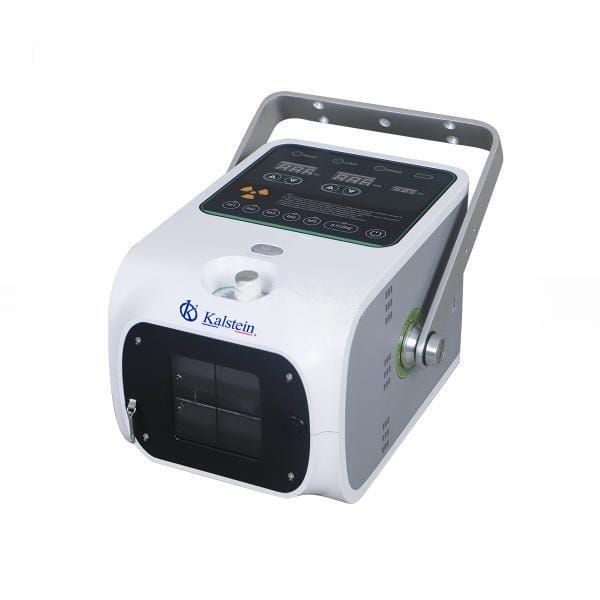
The YR06161 model is a cutting-edge digital portable X-ray device designed specifically for equine use. Given its unique capabilities and advanced technology, operators may encounter various symptoms affecting performance. Understanding these symptoms and their solutions is crucial for ensuring optimal operation and longevity of the equipment.
Understanding the YR06161 Model
The YR06161 is a digital portable X-ray machine that weighs only 7 kg, making it highly portable for outdoor use. Its large capacity battery can provide more than 200 exposures. This model features Bluetooth connectivity for easy connection to a tablet, allowing real-time adjustment of exposure parameters. Additionally, it offers six sets of shortcut keys to reduce errors and enhance efficiency.
Technical Specifications of YR06161
| Specification | Detail |
|---|---|
| Model | YR06161 |
| Power Supply | AC 220V/110V ±10%, 50 / 60 Hz |
| Power (kW) | 1.6 |
| kV | 50 ~ 90 |
| mAs | 20 |
| mA | 20 |
| SID Measurement | Ultrasonic |
| Light Source On Time (sec) | 30 |
| Communication | RS232/Bluetooth |
| Exposure | Hand Switch/315M |
| Weight (kg) | 7 |
| Focal Spot Sizes Tube (mm) | 1.2 |
| Target Angle Tube | 16° |
Troubleshooting by Symptoms
To ensure that users can effectively diagnose and resolve issues with the YR06161, we categorize common symptoms into specific sections. Each section outlines probable causes, diagnostic steps, and concrete solutions.
Equipment Does Not Power On
When the YR06161 fails to power on, it can be alarming. This section discusses potential causes and the steps to troubleshoot the issue.
Possible Causes
- Power supply issue
- Faulty battery
- Electrical connection failure
Diagnostic Steps
- Check the power outlet for functionality.
- Inspect the power cord for damage.
- Test the battery charge level.
Solutions
- Replace the power cord if damaged.
- Replace the battery if it cannot hold a charge.
- Ensure all connections are secure.
Error Code E-03
Error Code E-03 may indicate a specific malfunction that needs to be addressed promptly.
Possible Causes
- Software malfunction
- Calibration error
- Faulty internal components
Diagnostic Steps
- Restart the device to reset the software.
- Check for any firmware updates.
- Perform a self-diagnostic test.
Solutions
- Update the firmware if outdated.
- Contact technical support for internal component issues.
Inconsistent Readings
Inconsistent readings during operation can compromise diagnostic accuracy. It's essential to understand potential causes.
Possible Causes
- Improper exposure settings
- Environmental interference
- Calibration issues
Diagnostic Steps
- Review the exposure settings before each use.
- Check for any obstructions near the equipment.
- Recalibrate the device as per the user manual.
Solutions
- Adjust settings based on standard protocols.
- Ensure the workspace is free from electromagnetic interference.
Summary Table for Troubleshooting Symptoms
| Symptom | Possible Cause | Solution |
|---|---|---|
| Equipment Does Not Power On | Power supply issue | Check outlet and replace cord if damaged. |
| Error Code E-03 | Software malfunction | Restart device and check for updates. |
| Inconsistent Readings | Improper exposure settings | Adjust settings and recalibrate device. |
Frequently Asked Questions
What should I do if my YR06161 model displays an error code?
If the YR06161 displays an error code, refer to the troubleshooting section of this guide to identify the specific issue and follow the recommended solutions.
How do I connect the YR06161 to a tablet?
The YR06161 can be easily connected to a tablet via Bluetooth. Ensure Bluetooth is enabled on the tablet and follow the pairing instructions provided in the user manual.
What are the typical battery life and exposure capacity of the YR06161?
The YR06161 has a high-capacity battery that can provide more than 200 exposures on a single charge, making it ideal for extended use in the field.
Can I use the YR06161 in various environmental conditions?
Yes, the YR06161 is designed for outdoor use and can operate effectively under various environmental conditions, but it is essential to follow the manufacturer’s guidelines for optimal performance.
What maintenance is required for the YR06161 model?
Regular maintenance includes checking battery condition, inspecting cables, and ensuring proper calibration to maintain the reliability of the YR06161.
Where can I find replacement parts for the YR06161?
Replacement parts and accessories for the YR06161 can typically be obtained directly from the manufacturer or authorized suppliers, as detailed in the product documentation.
How can I request a quote for the YR06161 model?
Visit our website or contact our sales team to request a quote for the YR06161 model. They will assist you with pricing and availability.
If you are looking for a fusion of innovation and quality, you have come to the right place. At Kalstein, we offer you the luxury of exploring our exclusive catalog of laboratory equipment. We manufacture every device to the highest standards of excellence. Our intuitive and seamless online purchasing channels are designed for your convenience, securing the most competitive prices. Hesitate no longer — we bring science to life, it is time to become part of our community.